

Things used in this project
Hardware components | ||||
| × | 1 | |||
 |
| × | 1 | |
| × | 1 | |||
| × | 1 | |||
| × | 1 | |||
| × | 1 | |||
Software apps and online services | ||||
 |
| |||
| ||||
Hand tools and fabrication machines | ||||
 |
| |||
 |
|
Story
The Idea
I wanted to build a kitchen scale that could do more than just show weight
The idea was to combine a camera with a load cell so the scale could recognize the food placed on it, measure its actual weight, and automatically estimate calories and macros
I also wanted the computer vision to run locally instead of sending images to an external API, so I decided to use a Jetson Orin Nano for the AI part
My project ended up combining computer vision, embedded hardware, calibration, 3D printing, and UI design into one project
I started by imagining the final workflow I wanted:
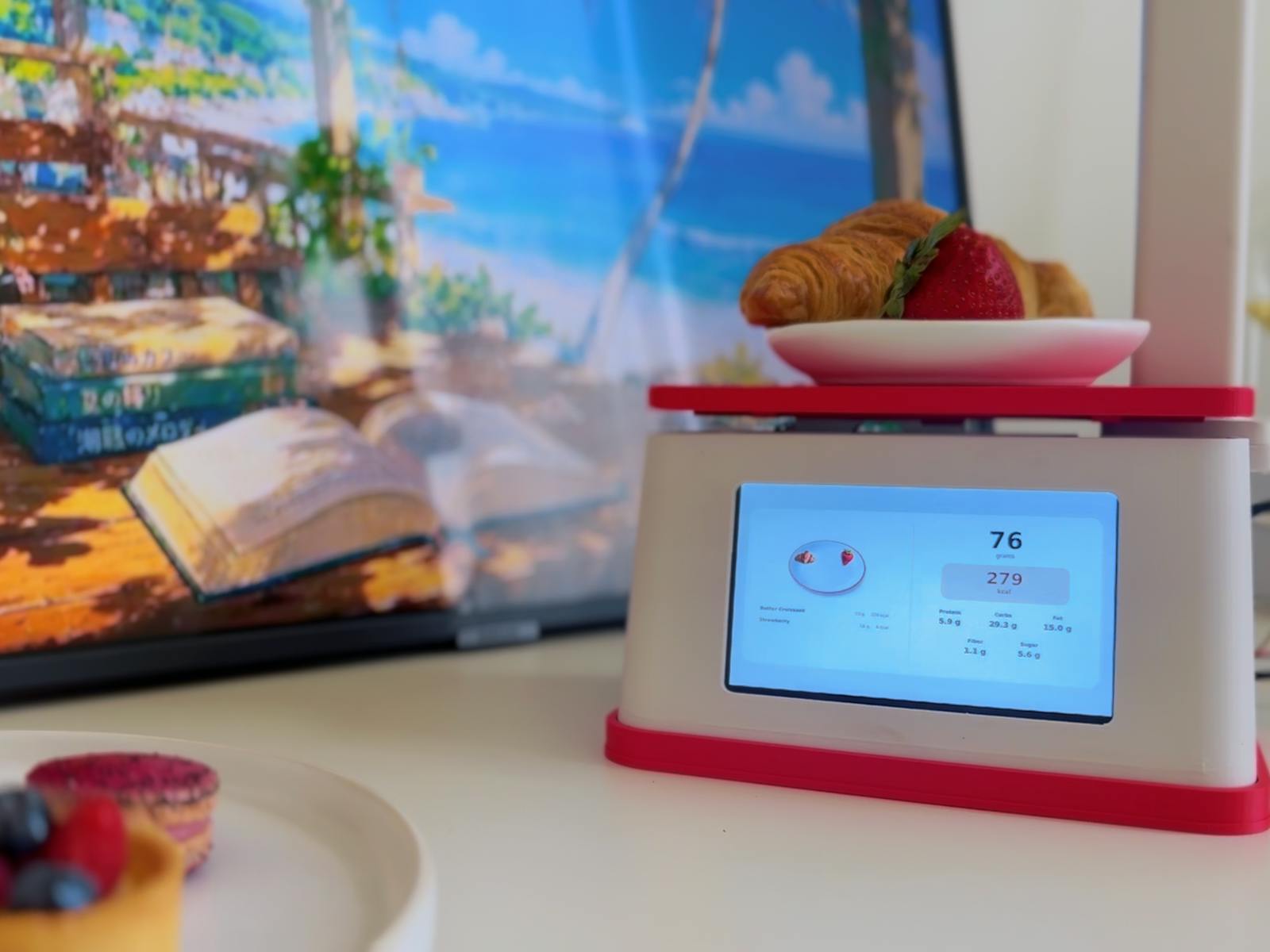
Place food on the scale, wait for the weight to stabilize, recognize the food with the camera, and show the result on the touchscreen
The finished prototype can recognize the food, measure its weight, and estimate calories, protein, carbohydrates, fat, fiber and sugar
For this version I trained it on four foods:
- Strawberry
- Croissant
- Raspberry macaron
- Fruit tart
I kept the number of classes small because I wanted to focus on getting the complete hardware and software system working first
Building the Scale
The main computer is an NVIDIA Jetson Orin Nano
The Jetson controls camera, runs the YOLO model locally, processes detections, and runs the touchscreen application
For measuring weight, I used a 5 kg TAL220B load cell connected to an HX711 amplifier
A Seeed Studio XIAO RP2350 reads the load cell and sends the weight measurements to the Jetson over serial
- NVIDIA Jetson Orin Nano
- Seeed Studio XIAO RP2350
- TAL220B 5 kg load cell
- Grove ADC for Load Cell (HX711)
- X10 USB wired camera
- 5-inch 800×480 touchscreen
- 3D printed enclosure
Measuring Weight
Getting reliable weight measurements was one of the first parts I worked on
The XIAO RP2350 continuously reads the HX711 and sends weight data to the Jetson
I added averaging and a small zero threshold to reduce noise around zero
The application also waits for the weight to become stable before trying to recognize a new food item. This was important because the reading naturally changes while something is being placed on the scale
The final firmware also supports tare directly from the touchscreen application
Calibration
Before the load cell could give meaningful measurements, I had to calibrate it
I used several known reference weights and compared the raw load-cell readings against their actual weights
From those measurements I calculated the calibration factor used in the firmware
I also created a separate calibration sketch so the load cell can be recalibrated if the hardware changes
This part taught me that the mechanical design is just as important as the electronics. Even with the correct calibration factor, the platform needs to transfer the load consistently to the sensor without touching other parts of the enclosure
Designing the Enclosure
I designed the enclosure in OpenSCAD and 3D printed the parts
The enclosure had to hold quite a few things at once:
- Jetson
- Touchscreen
- Load cell
- Weighing platform
- Camera
- Wiring
- Structural supports
I wanted the final prototype to look more like one complete device instead of several development boards sitting next to each other
I designed separate parts for the base, structural frame, load cell mount, weighing platform, camera stand, and camera holder
This was also one of the parts where I learned the most through iteration. Small mechanical details that look fine in CAD can become very noticeable once everything is printed and assembled
For future projects I want to spend even more time modeling the complete assembly before printing
Final OpenSCAD assembly before 3D printing.
Creating the Dataset
Once the hardware was working, I moved to the computer vision part
I collected my own images for the foods I wanted the scale to recognize
For this version I used four classes and photographed the items in the same general environment where the final system would be used
I then labeled the images with bounding boxes and converted the dataset into YOLO format
The dataset was intentionally small and controlled because my main goal was to build and test the complete system rather than create a general purpose food recognition model
Training the Model
I trained a YOLOv8n model using Ultralytics
The training configuration was:
- Model: YOLOv8n
- Image size: 640
- Epochs: 80
- Batch size: 4
- Train/validation split: 80/20
I used the smaller YOLO model because I wanted fast local inference on the Jetson while keeping the system responsive
After training, I tested the model with the live USB camera and adjusted the detection logic based on the mistakes I saw
The model is still limited to the foods it was trained on, but it worked well enough for the prototype and gave me a good foundation for expanding the dataset later
Running AI Locally on Jetson
One of the main goals of the project was to keep food recognition local
The USB camera connects directly to the Jetson, and the YOLO model runs there without needing an internet connection or cloud inference API
The application processes several frames instead of trusting a single detection
I added multi-frame consensus so a food needs to be detected consistently before the application accepts the result
This helped reduce occasional incorrect detections
Combining Vision and Weight
This was probably the most interesting part of the project
Food recognition alone is not enough because the system also needs to know how much food was actually added
The application watches for a meaningful change in weight and then waits until the reading becomes stable
After that, the camera analyzes the scene and the software compares the detections with the previous state of the plate
This allows the application to determine what was added and associate the weight change with that food
I also added logic to cancel recognition if the weight changes again while the system is processing, which helps avoid analyzing the scene while someone is still moving food around
Calculating Nutrition
After the food class and weight are known, the nutrition calculation is relatively simple
For every supported food I store nutrition values per 100 grams
The application scales those values according to the measured weight and calculates estimated:
- Calories
- Protein
- Carbohydrates
- Fat
- Fiber
- Sugar
The nutrition information is stored separately from the application logic, which makes it easier to add more foods later
These values are estimates and the project is intended as a prototype rather than a medical or dietary measurement device
Building the Touchscreen UI
I built the interface in Python using PyQt5
I wanted the scale to feel like a standalone device, so the application runs full-screen on the 5-inch touchscreen
The interface displays the detected food, its weight, calories, and nutrition information
I also created a plate-building mode so multiple foods can be added one after another and tracked together
The UI communicates with the XIAO over serial for weight measurements and tare commands while the Jetson handles the camera and AI processing
Putting Everything Together
The final system combines several independent parts:
The load cell measures the weight
The XIAO reads the load cell and sends measurements to the Jetson
The Jetson watches for stable weight changes
The camera captures the food
YOLO recognizes the food locally
The application combines the recognition result with the measured weight
Nutrition is calculated and displayed on the touchscreen
Getting all of those parts to work together reliably was much more interesting than any single part of the project on its own
Final Result
The finished prototype can recognize the foods it was trained on, measure their weight, and automatically estimate nutrition
It can also track multiple items as they are added to the plate
There are still many things I could improve, but I’m happy with how the first version came together
The project gave me a chance to work with computer vision, embedded hardware, serial communication, mechanical design, 3D printing, calibration, and UI development all in one build
What I’d Improve Next
The biggest improvement would be expanding the dataset
Right now the model only recognizes four foods, but the same system could be trained on many more classes
I would also like to collect a more varied dataset with different lighting conditions, plate positions, backgrounds, and food arrangements
Mechanically, I would improve how the weighing platform is constrained so its position is more repeatable and there is less chance of it contacting surrounding parts when the load is placed far from the center
I’d also like to improve the enclosure design and continue learning more traditional CAD tools such as Fusion 360
There are a lot of possible directions for this project: recipes, meal tracking, a larger food database, better nutrition data, improved food recognition, and more advanced plate tracking
For now, I’m just happy I got all of the pieces working together in one prototype 😊
Read more
Custom parts and enclosures
Schematics
Code
Credits

Marina
2 projects • 1 follower
ContactContact
